

Hotels sometimes need to issue Wi-Fi access outside the normal checked-in guest workflow. Walk-in visitors, business lounge users, contractors, event delegates and other guests may need a temporary, complimentary or prepaid Internet account while they are on the property.
A guest Wi-Fi account printer is a compact device that creates the Internet account and prints the login credentials for the user on the spot. For hotels evaluating one, five practical questions cover most of what matters in day-to-day operations.
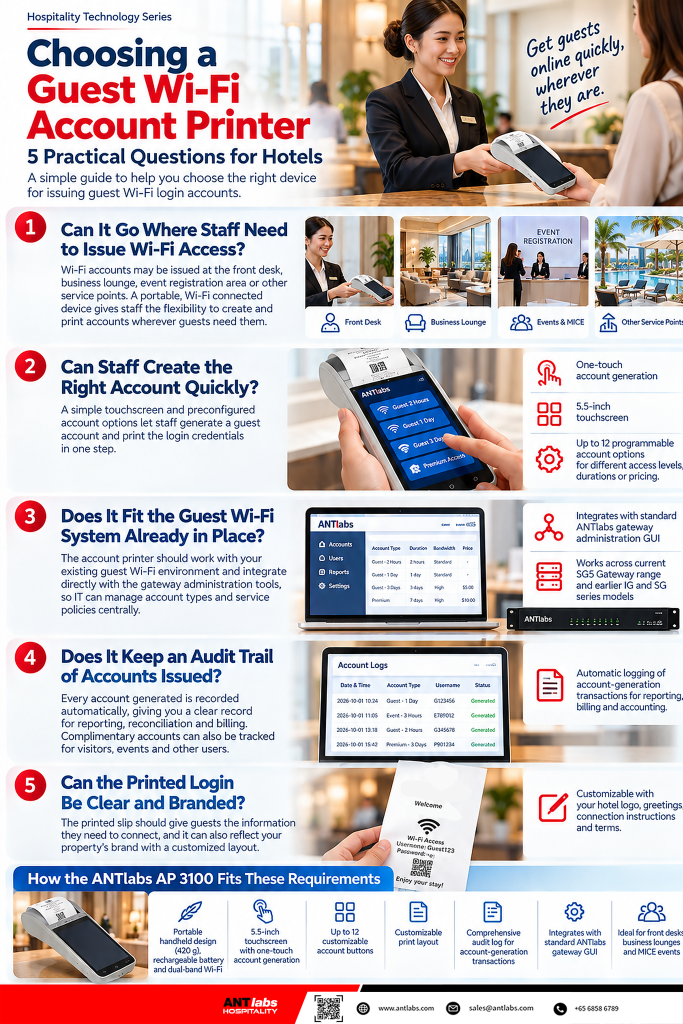
Guest Wi-Fi accounts may be issued at the front desk, in a business lounge, at an event registration counter or from another service point around the property.
A lightweight account printer with a rechargeable battery and Wi-Fi connectivity gives staff the flexibility to create and print an account wherever service is being provided. The device can move between locations during the day while remaining connected to the hotel’s guest Wi-Fi system.
This is particularly useful for conferences, temporary service counters and busy periods when access needs to be issued from more than one part of the hotel.
Front-of-house teams should be able to select the required Wi-Fi service without navigating through network administration screens.
Preconfigured account options make this easier. Hotels may want different choices for complimentary access, paid service, access duration, bandwidth level or event use, with the common options already available to authorized staff.
A simple touchscreen interface and clearly labelled account choices allow the employee to select the appropriate service, generate the account and provide the login details within the same interaction with the guest.
The account printer should work as part of the hotel’s existing guest Wi-Fi environment. Integration with the gateway allows IT to configure account types and service policies centrally while front-of-house teams use the printer for day-to-day account issuance.
Gateway compatibility is also worth checking, particularly for hotels operating equipment installed at different times. Support across several gateway generations gives properties more flexibility when adding or replacing an account printer.
For hotel IT, this keeps guest account provisioning within the same Wi-Fi management environment used for the rest of the service.
Temporary, complimentary and prepaid accounts all form part of the hotel’s guest Wi-Fi service, so a clear record of the accounts generated is useful for reporting, reconciliation and billing.
An automatic audit trail allows management to review when accounts were created and which service plans were issued. Properties offering charged Internet access can use these records for accounting, while complimentary accounts can also be tracked for visitors, functions and other users.
This gives the hotel a reliable operational record while keeping the account-generation process simple for the staff member issuing the access.
The printed slip should give the guest everything needed to connect, including the login credentials, instructions and any relevant conditions of use.
A customizable print layout also allows the hotel to include its logo, welcome message, connection instructions, terms and conditions, or other useful information. Once the layout is configured, every account can be presented consistently.
It is a small guest-facing touchpoint, but it can still reflect the same brand standards used throughout the rest of the hotel experience.
The ANTlabs AP 3100 combines these functions in a handheld guest Wi-Fi account printer designed for hospitality and visitor networks.
At 420 grams, with a rechargeable battery and dual-band Wi-Fi connectivity, the AP 3100 can move between the front desk, business lounge, event area and other service points around the property. Its 5.5-inch touchscreen allows an account to be generated and the login credentials printed in the same operation.
Up to 12 programmable buttons can be configured for different account types, access levels, durations or pricing. Staff can select the required option directly from the device, while IT continues to manage the account configuration through the ANTlabs gateway environment.
The AP 3100 integrates with the standard ANTlabs gateway administration GUI and supports the current SG5 Gateway family as well as a range of earlier ANTlabs IG and SG platforms. Properties already using ANTlabs guest Wi-Fi can therefore add portable account provisioning within their existing gateway environment.
Each account-generation transaction is recorded in an audit log for reporting, billing and accounting, while the printed credential slip can be customized with the hotel’s logo, greetings, connection instructions and terms.
The same portability also suits MICE environments, where the AP 3100 can be positioned at an event registration area or used for self-service Internet account generation according to the event setup.
A guest Wi-Fi account printer has a focused role: create the appropriate account quickly, provide clear login information and keep a reliable record of what was issued. Portability, straightforward account selection, gateway integration, audit logging and customizable printing are therefore practical criteria for evaluating how well a device will fit hotel operations.
For properties already using ANTlabs guest Wi-Fi, the ANTlabs AP 3100 brings those capabilities together in a portable device that works directly with the ANTlabs gateway environment and can be used wherever guest, visitor or event access needs to be issued.
Talk to our team about adding the AP 3100 to your ANTlabs hospitality Wi-Fi deployment.
https://hospitality.antlabs.com/enquiry
#ANTlabs #AP3100 #HospitalityTech #HotelWiFi #HotelIT #GuestWiFi #MICE #GuestExperience #DeploymentFlexibility